
Most commercial cleaning and building services companies do not run one system. They run a bid app, an inspection app, a time clock, and a payroll system, and the data on a single account lives in all of them. This guide maps the market by the job each tool does and names the credible options in each category, so you can see where buying off the shelf is the right call and where a custom build pays off.
The market, by category
Pick the category that matches your bottleneck, not the tool with the longest feature list. Each category below solves a different job, and the credible products in it are named so you can shortlist fast.
One system for scheduling, time, inspections, and billing, so an account's data lives in a single place.
WinTeam (TEAM Software) runs the back office for large building service contractors (BSCs). Aspire fits multi-branch service companies. BrightGo, Janitorial Manager, Swept, and SweepOps are janitorial-native platforms aimed at small and mid-size cleaners.
Compare all-in-one platformsTurn a walkthrough into a priced proposal before the rep leaves the lot.
CleanGuru, Clean Proposals, and CleanlyRun capture measurements and fixtures on site and generate a bid. JaniBid bundles per-service calculators and a CRM for a company getting started. Route BID does the same from a phone. QuotePro layers AI pricing on top.
Compare bidding softwareScore the clean and prove it to the client before a missed item becomes a cancellation.
OrangeQC and CleanTelligent run mobile inspections with photos and corrective-action tickets. Swept and Smart Inspect bundle inspections with workforce tools.
Compare QC and inspection softwareTrack who worked which site and pay them right without a Friday reconciliation scramble.
Chronotek, Workyard, ClockShark, and Hubstaff handle GPS time tracking for distributed crews. Connecteam and When I Work cover scheduling and crew communication. QuickBooks Time feeds payroll. What belongs on the crew's phones is mapped on the crew mobile app guide.
Compare time tracking and payrollFind and win new accounts instead of waiting on referrals.
Appointment setters like Abstrakt and Janitorial Leads Pro book meetings on a retainer. Apollo and similar tools sell contact data you run yourself. Route Exchange and JaniJobs connect contractors with subcontract work.
Compare lead-generation optionsHow the janitorial software market is structured
The janitorial software market splits into point tools and suites. Point tools do one job well: a bidding app like CleanBid or an inspection app like OrangeQC. Suites like Janitorial Manager or Swept promise the whole operation in one login, usually built around scheduling and the crew app. At the edge of the market sit general field-service platforms such as Aspire, strongest in landscaping and field service and adapted to commercial cleaning, which is why a building service contractor shortlisting options often ends up weighing a janitorial-specific product against a platform built for another trade.
Two shifts are worth knowing about. Consolidation is real: Aspire now sits under ServiceTitan, and point tools keep adding neighboring features until they read like small suites. The work has also moved to the phone, so the crew app now decides adoption for the whole system. What has not changed is that no vendor owns this market, because a commercial cleaning company's bottleneck decides which class of tool matters, and bottlenecks differ shop to shop.
For a buyer, the market map matters less than your own workflow. The categories above name the credible products for each job, and the operation scorecard shows which job is costing you accounts today.
Where a custom build fits
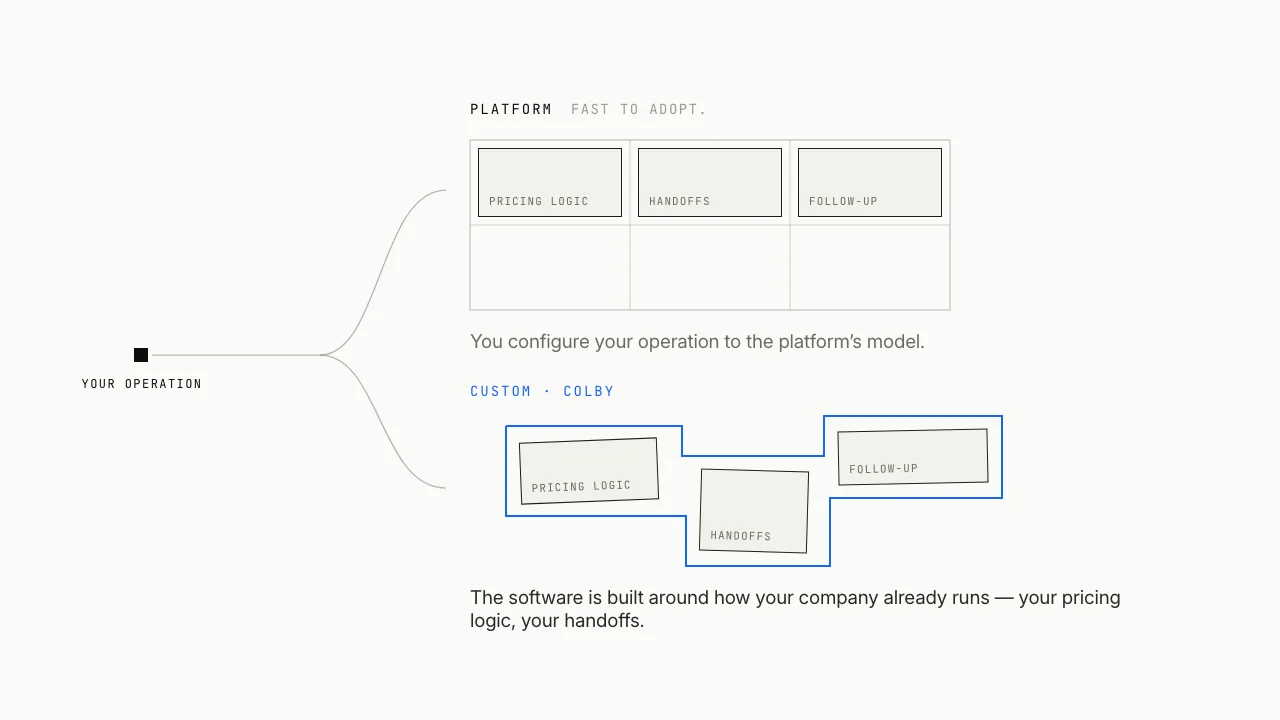
Off-the-shelf software is built once and configured for every cleaning company. That is the right answer when your workflows match how the product expects you to run, and for many operators it stays right for years.
The gap shows up when your edge is in how you operate and the product keeps almost fitting. The data stays split across tools, the owner re-keys numbers between them, and the one workflow that wins and keeps accounts is the one no product quite covers. That is where a custom build earns its place: software shaped around how your company already runs, wired into the systems you keep.
What Colby builds for janitorial companies
Colby is the custom path. Every build removes one operational bottleneck you choose, and the AI is how it gets done. Builds land in three categories, and each ships with hosting and maintenance.
Walkthrough notes to a priced proposal without re-keying, on your pricing logic, so quotes stop depending on one manager.
Time reconciliation, payroll prep, QC that flags a problem before the client does, and the account lifecycle from contract start to renewal.
Account sourcing and grounded outreach, so the pipeline runs whether or not anyone has a free afternoon.
How to choose
Start with the bottleneck. Slow quoting often needs nothing more than a bidding app, and the free janitorial quote calculator puts a first number on a building in about a minute. Accounts churning over missed inspections point to QC software, and machines and supplies you cannot account for point to inventory and equipment software. The signal for a custom build is different: the same account's data scattered across four tools, with the owner acting as the integration.
Some contracts raise the bar on their own. Cleaning an airport terminal adds authority audits and prevailing-wage payroll on top of the ordinary work, and industrial and warehouse accounts turn the bid into a floor-care problem measured in acres. A medical office raises it again the moment a patient area is involved, with infection-control audits and room-by-room disinfection. A school runs on the academic calendar, with custodial crews cleared to work around students and inspections held to a district standard. A gym or fitness center is judged on its locker rooms and equipment, where a missed shower turns into a cancelled membership. A retail chain is priced store by store on its floor program, with every location held to one brand standard. The software question on each is different from an office park.
Colby starts with a three-week discovery that maps how work moves through your company, then delivers a readout: a prioritized menu of builds you choose from. You own what we build, and we host and maintain it. The fastest way to see where you stand is to score your operation or start a quote.
Common questions
Do I need all-in-one janitorial software, or separate tools for each job?
Most commercial cleaning companies run several point tools: a bidding app, an inspection app, a time clock, and a payroll system. An all-in-one platform consolidates those into one product, which helps when your workflows fit how it expects you to run. When one account's data keeps ending up split across tools and the owner is the integration between them, that is the signal a single connected system pays off.
When is custom software worth it instead of an off-the-shelf platform?
Off-the-shelf is the right call when your workflows match how the product works, and it stays right for years. A custom build earns its place when your edge is in how you operate and the product keeps almost fitting, so the one workflow that wins and keeps accounts is the one no packaged tool quite covers. Colby builds one bottleneck at a time rather than replacing everything.
What is the best janitorial software for a small commercial cleaning company?
Start with the bottleneck, not the longest feature list. Slow quoting usually needs a bidding app, and accounts churning over missed inspections point to QC software. When the same account's data is scattered across four tools and you cannot see margin per building, a connected or custom system helps more than another point tool.
Can I keep my current software and still add a custom build?
Yes. A custom build covers the one workflow your platform cannot, wired into the systems you already run, so you skip a full migration to get the piece you were missing. You keep what works and add only the part that was forcing a spreadsheet on the side.
How does a Colby engagement start?
It starts with a three-week discovery that maps how work moves through your company, from intake and quoting to scheduling, payroll, and billing. Discovery ends with a readout: a prioritized menu of builds you choose from. You own what gets built, and Colby hosts and maintains it.
Tell us what you are evaluating. We will reply within one business day and walk you through what the custom path would look like for your operation, including whether a discovery is worth it before you commit to a platform.
Reply within 1 business day · NDA-friendly · No build prices before discovery